Backup
Copy a game and its save off the cartridge to the PC or SD card, verified on the way in.
ChroMagic adds cartridge backups, SD card playback, and a desktop companion app to the ModRetro Chromatic. Free, open source, and here for anyone who wants it.
Everything the Chromatic already does stays exactly where it is. ChroMagic just slips a few new entries into the menu.
Install ChroMagic

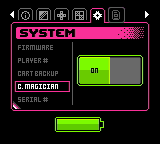
CART BACKUP lives in the SYSTEM menu. One press of A copies the game and its save to the SD card, named and sorted. No PC, no cables, no ceremony.
ChroMagician handles backups over USB as well, to the PC or straight to the SD card.
Back up on your ChromaticBACKUPS is a new tab in the menu. It lists the games on the SD card, and A boots the selected one.
A game boots straight from the SD card with its save right where it was left, exactly as if the cartridge were in the slot. The originals stay safe in their boxes.
It’s the app that knows what’s in the cartridge slot. It also installs ChroMagic in two clicks.
With the Chromatic plugged in over USB and C. MAGICIAN switched on, the cartridge shows up on the PC. From there it can be backed up, have a rescued save put back on it, or, if it’s a Chromatic cart, get homebrew flashed onto it. The SD card shows up too, so backups can be tidied without opening the Chromatic.
Back up and restore with ChroMagicianCopy a game and its save off the cartridge to the PC or SD card, verified on the way in.
Write a save back onto the cartridge it came from. New battery, same old team.
Flash homebrew onto any Chromatic game cartridge. More cartridge types are on the way.
Grab ChroMagician, plug in, click twice.
ModRetro makes the handheld and a growing shelf of cartridges worth owning. All of this only gets better with more of both.